| Swatch Width |
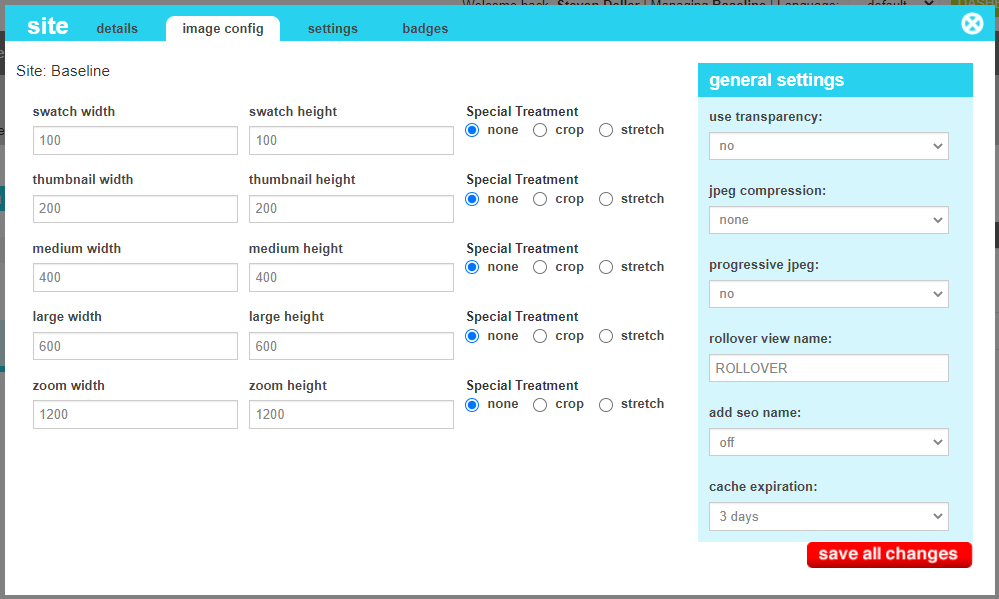
The width of the swatch image view. This dimension is applied when the marketAgility Image Cutter is used on batch image uploads, or when uploading a Master Image through the admin tools. |
| Swatch Height |
The height of the swatch image view. This dimension is applied when the marketAgility Image Cutter is used on batch image uploads, or when uploading a Master Image through the admin tools. |
| Thumbnail Width |
The width of the thumbnail image view. This dimension is applied when the marketAgility Image Cutter is used on batch image uploads, or when uploading a Master Image through the admin tools. |
| Thumbnail Height |
The height of the thumbnail image view. This dimension is applied when the marketAgility Image Cutter is used on batch image uploads, or when uploading a Master Image through the admin tools. |
| Medium Width |
The width of the medium image view. This dimension is applied when the marketAgility Image Cutter is used on batch image uploads, or when uploading a Master Image through the admin tools. |
| Medium Height |
The height of the large image view. This dimension is applied when the marketAgility Image Cutter is used on batch image uploads, or when uploading a Master Image through the admin tools. |
| Large Width |
The width of the large image view. This dimension is applied when the marketAgility Image Cutter is used on batch image uploads, or when uploading a Master Image through the admin tools. |
| Large Height |
The height of the large image view. This dimension is applied when the marketAgility Image Cutter is used on batch image uploads, or when uploading a Master Image through the admin tools. |
| Zoom Width |
The width of the zoom image view. This dimension is applied when the marketAgility Image Cutter is used on batch image uploads, or when uploading a Master Image through the admin tools. |
| Zoom Height |
The height of the zoom image view. This dimension is applied when the marketAgility Image Cutter is used on batch image uploads, or when uploading a Master Image through the admin tools. |
| Special Treatment |
This treamtent is applied if the supplied image is larger that the defined dimensions of the view.
- None - If the image is larger than the desired dimensions, the image is resampled and letterboxed if necessary to fit.
- Crop - If the image is larger than the desired dimensions, a section from the center of the source image is cropped with the desired dimensions.
- Stretch - If the image is smaller than the desired dimensions, the image is stretched to fill the desired dimension.
If
|
| Use Transparency |
This indicates if you wish any transparency in the source image to be maintained in the resulting transformed image. Note this only applies to png and gif formats. |
| Title |
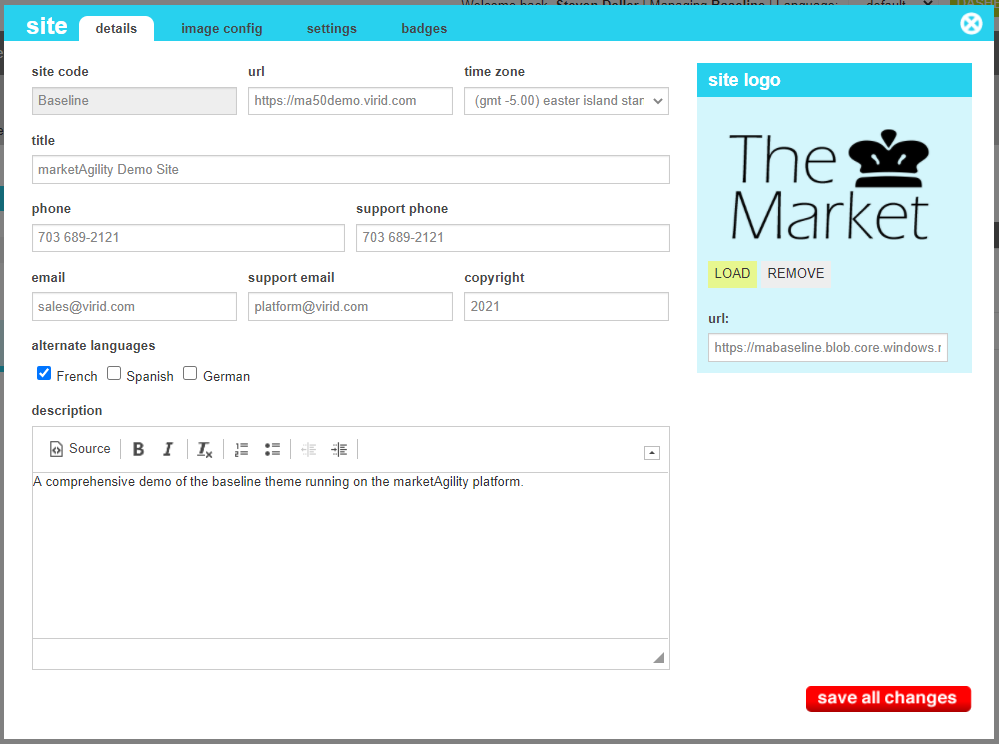
This value is used as the default title for the home page and all other pages where a more distinct title has not been provided. |
| Phone |
This is the general company phone number that will appear in your header or footer of the website. |
| Support Phone |
This is a secondary phone number that can appear in your contact us forms for getting technical support with using the site.
Frequently it is the same as the main phone number.
|
| Email |
This is the email that will be displayed in the footer or contact us pages for contacting the merchant . |
| Support Email |
The is the email were site errors and system alerts will be sent. Typically it is the IT mailbox for the merchant, or
a Virid team mailbox for Enterprise customers.
|
| Copyright |
This is the copyright date of the site. Typically, the copyright of a theme is programmatically generated by the theme, but it it should
be a fixed date or message, this field can be used instead.
|
| Alternate Languages |
This value indicates what alternative languages are enabled on this site. If the option is checked, it will appear in the
admin tool dropdown allowing you to change to that language when editing content. Once the language has been selected,
any text content entered should be in the selected language. For customers browsing your site, once they have
selected their desired language, all content displayed will be taken from your language-specific variants if available.
If you have not crafted a language variant for a specific piece of content, the content from the default language will be
displayed instead.
|
| Description |
This content is presented in the <meta content="description"> tag sitewide if not overwritten by the template or page
specific rules. It also can be used in the header or footer if desired.
|
| Site Logo |
The site logo allows you to upload and modify the logo image used in the header of the site. It is often useful for creating
seasonal variation of your site logo. ALlowable formats include PNG, GIF and JPG.
|