The payments tool allows an administrator to manage the payment methods availabe to customers on the website, and which payment processor should be used to service authorizations, bills and credits. If your
site is using one of the 3rd party Payment Provider Plugins, this tool allows you to also configure the access credentials for the staging and production environments as well as the various options provided by the specific plugin.
Searching
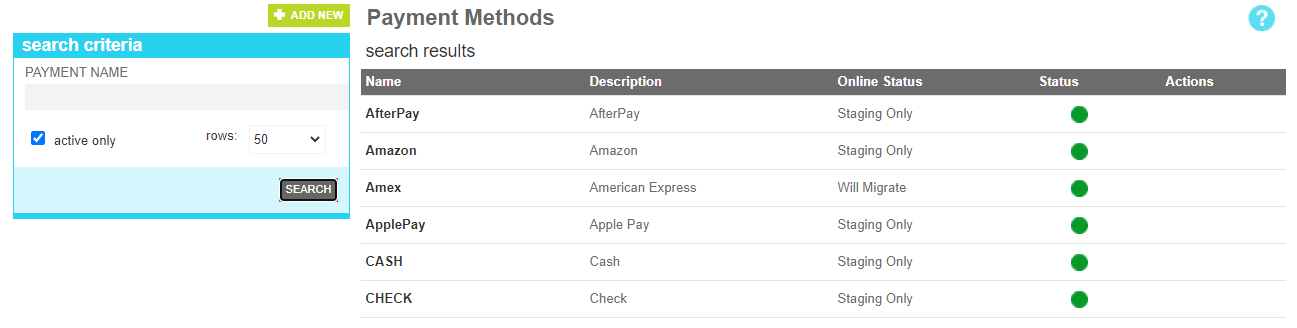
To find a payment method or methods that share a common attribute value, a search block has been provided. To add a new one, use the "Add New" button
Searching for a payment method
These attributes are as follows:
Property
Description
Payment Name
All or part of the payment name
Active Only
Filters your result to only show currently active payments
Rows
Limits the results to the indicated number.
Details
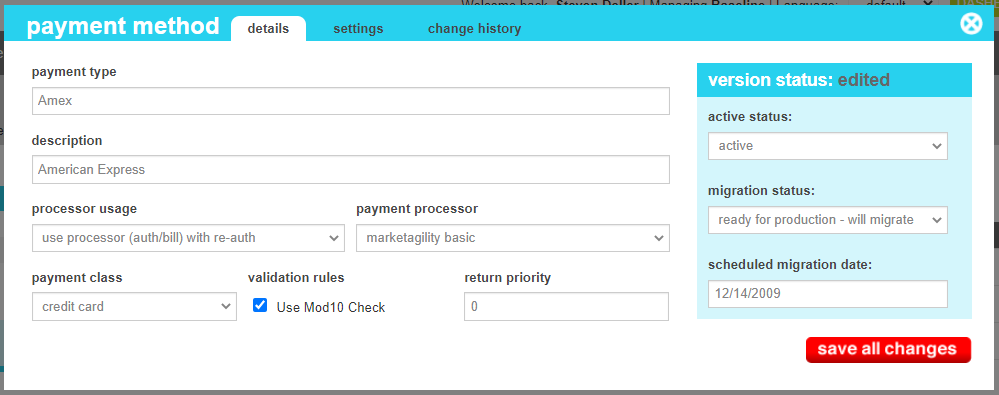
The details screen allows you to manage the payment description information and generic configuration, including the type of payment, the authorization type, return priority and processor plugin that will service it.
Payment Details
These attributes are as follows:
Property
Description
Payment Type
The name/code that uniquely identifies the payment.
Description
A short description of the nexus to explain it to other administrators
Processor Usage
This indicates how the processor shold be used when customers place an order.
No Processor - Bypass the external processor complete and accept all requests of this type. Typically used for cash, PO or Money orders.
Use Processor (Sale) - Use the payment processor and collect the full amount of the order at the time of sale.
Use Processor (Auth/Bill) with re-auth - Use the payment processor and put an auth hold on the funds at the time of sale. Settle against the authorization when the order ships in the event of a short shipment re-authorize for the remaining amount immediately.
Use Processor (Auth/Bill) with deferred re-auth - Use the payment processor and put an auth hold on the funds at the time of sale. Settle against the authorization when the order ships and in the event of a short shipment, re-authorize and bill for the remaining amount at the next shipment is performed.
Payment Processor
The plugin that will service auth, bill and credit requests. By default, this is set to marketAgility Basic. If you do not see your
third party provider listed, make sure you have registered the email provider in the Service Provider tool.
Payment Class
The general class of payment. Setting this item correctly helps your checkout pages group similar methods together accordingly.
Validation Rules
Indicates which of the built-in valudation rules a card number confirms to. Currently only Mod10 checks are available.
Return Priority
The order in which this payment should rank when issuing credites from a return. When an order is multi-tender, credits will be
issued to the payment methods used in the order of return priority starting with the lowest number
Active Status
Indicates whether the payment is active or inactive. If the payment is inactive, it will not appear on the website
Migration Status
Indicates whether the current state of this nexus is visible only on staging, will be migrated to production, or is currently on production.
Scheduled Migration Date
For items that are ready to migrate, this is the date that the changes should be migrated to production. For items that are on production, this date indicates when the change was actually migrated.
Change History
The change history tab shows all of the changes that were made to this user and by whom. It is useful for diagnosing unexpected changes to your administrator accounts.