System Emails
The system emails tool allows an administrator to manage the various customer touchpoint emails available in the system. It also provides the ability to create custom email templates that can be implemented in your website workflow.

The system emails tool allows an administrator to manage the various customer touchpoint emails available in the system. It also provides the ability to create custom email templates that can be implemented in your website workflow.
To find a system email or emails that share a common attribute value, a search block has been provided. If you wish to create a new one, click the "Add New" button above the search block.

These attributes are as follows:
| Property | Description |
|---|---|
| Email Template | The exact name of the email template |
| Active Only | Filters your result to only show currently active users |
| Rows | Limits the results to the indicated number. |
The details screen allows you to manage the email information, including the name, description, subject, sender and HTML message body.
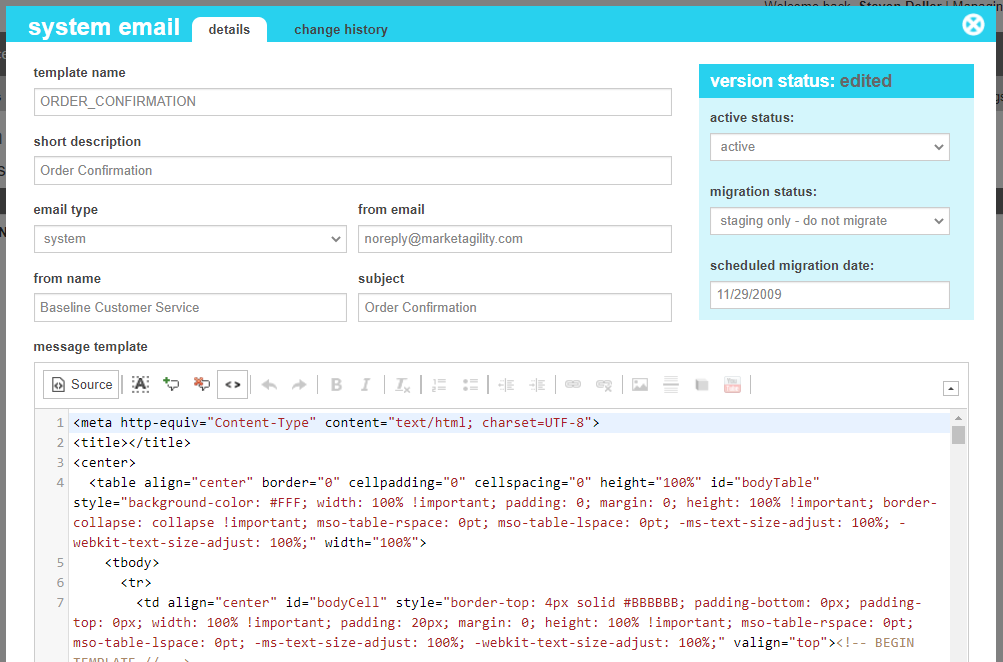
These attributes are as follows:
| Property | Description |
|---|---|
| Template Name |
The name of the Email template. For custom email templates, this can be any value of your choosing,
as long as it is unique to your website. In order have the system send out the email automatically as part of an event, it must be one of the following values, depending on the event.
|
| Short Description | A description of the template and what is is used for. |
| Email Type |
An indicator as to what type of email it is.
|
| From Email | The email address that the email should be sent from. |
| From Name | An email alias that describes the sending email address to your customer. For example: "Customer Service". This will appear in the message header when it is receivd |
| Subject | The subject line of the email |
| Message Template | The HTML body of the message. |
| Active Status | Indicates whether the system email is active or inactive. If the email is inactive, an email will not be sent during the indicated event. |
| Migration Status | Indicates whether the current state of this method is visible only on staging, will be migrated to production, or is currently on production. |
| Scheduled Migration Date | For items that are ready to migrate, this is the date that the changes should be migrated to production. For items that are on production, this date indicates when the change was actually migrated. |
System emails that are driven by marketAgility events can be customized by inserting personalized, event specific information into the body of the email, dependent on the availabilt of the data and the action being peformed.
Each dynamic field uses a mustache template format (eg: ) and must match the available data property in case and spelling in order for data to be successfully merged into the template.
These attributes are as follows:
| Template | Description | Available properties |
|---|---|---|
| RESET_PASSWORD | Sent to the customer's email via the website when they select "Forgot Password" and that email matches a username registered on the site or via marketAgility when a Customer Service Rep clicks "Send Password" in Call Center → Users. Directs users to account > reset.aspx with a time-stamped token. The reset page itself controls the duration that token is active. |
|
| ACCOUNT_CREATED | Sent to the customer via the website when a new website account is set up either via account > login.aspx, Login Modal, checkout > login.aspx, or checkout > complete.aspx or via marketAgility when a Customer Service Rep creates a new user in Call Center → Users. |
|
| PASSWORD_CHANGED | Sent to the customer via the website when the password on their account has been updated via the password reset page - account > reset. |
|
| ORDER_CONFIRMATION | Sent to the customer via the website when their order is placed on checkout > review.aspx or if the checkout complete API is called (not in default) or via marketAgility when an order is placed in the Call Center → Cash Register. |
|
| RETURN_CONFIRMATION | Sent to the customer via the website when a return has been processed through the admin tool, or if the return confirmation API is successfully called. |
|
| SHIPMENT_CONFIRMATION | Sent to the customer via marketAgility when any part of their order has been marked as shipped in Warehouse → Order Edit → "Shipments" tab or the Call Center → Order Edit → "Shipments" tab. |
|
| CANCEL_CONFIRMATION | Sent to the customer via marketAgility when an Item on their order or their entire order has been cancelled in Call Center → Order Details. |
|
| CREDIT_CONFIRMATION | Sent to the customer via marketAgility when they have been given an order credit unrelated to a return in Call Center → Order Details → "Appeasements" tab. |
|
| SHARE_WISHLIST | Sent by the customer to an entered email address via the website when they complete and submit the "Share Your Wishlist" form on account > wishlist |
|
| SHARE_PRODUCT | Sent by the customer to an entered email address via the website when they share a product from the product template. The UX for this functionality may not be built into your site, however this is an available template. See your Client Manager if you want to discuss adding this feature to your site. |
|
| GIFT_CERTIFICATE | Sent to the marketAgility gift certificate recipient via marketAgility when a new gift card has been created in Call Center → Gift Cards or the customer service agent clicks "Resend Email". |
|
| CONTACT_US | Sent to the support email contact set up in the Site Settings via the website when a Customer fills out the form on the contact-us page. |
|
The change history tab shows all of the changes that were made to this content item and by whom. It is useful for diagnosing unexpected changes to your content.