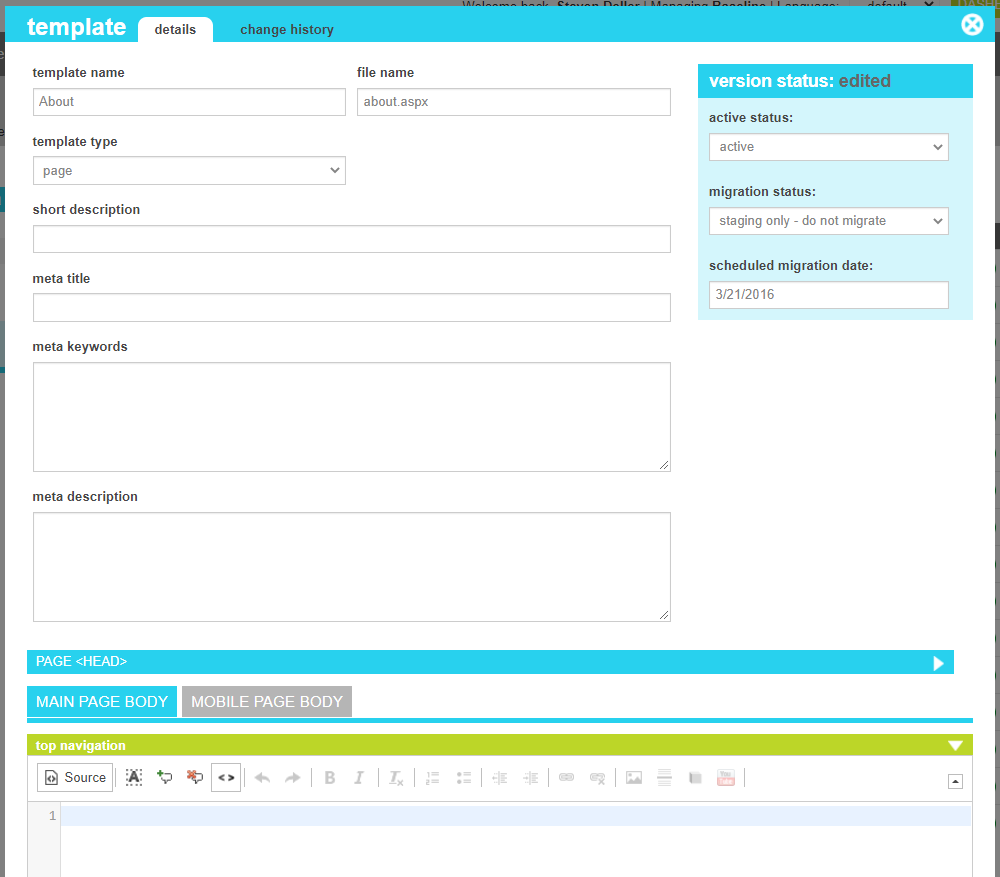
| Template Type |
The name that uniquely identifies the template. |
| File Name |
The physcal filename of the page that will service this template. Eg: mypage.aspx
If the page is in a folder, include the folder as well, eg: /account/account-main.aspx
|
| Template Type |
This indicates which content type this page should be associated with. It also drives which section of the admin tools
it will appear in, allowing your business users to select it for servicing their content.
|
| Short Description |
This is a brief descritpion of what the page is used for. Typically only relevant throughout the admin tools,
although it could alse be referenced by your pages.
|
| Meta Title |
This value will be placed in the <title> tag of your site. |
| Meta Keywords |
This value will be placed in the <meta content="keywords"> tag of your site. |
| Meta Description |
This value will be placed in the <meta content="description"> tag of your site. |
| Page <head> |
This HTML content will appear in the <head> block of your site. |
| Main Page Body - Top Navigation |
This HTML content can be made visible to your Desktop or Responsive visitors in the navigation block |
| Main Page Body - Main Content |
This HTML content can be made visible to your Desktop or Responsive visitors in the main body block |
| Main Page Body - Bottom Navigation |
This HTML content can be made visible to your Desktop or Responsive visitors in the bottopm navigation block |
| Mobile Page Body - Top Navigation |
This HTML content can be made visible to your Mobile specific visitors in the navigation block. It is only typically used in non-responsive themes. |
| Mobile Page Body - Main Content |
This HTML content can be made visible to your Mobile specific visitors in the main body block. It is only typically used in non-responsive themes. |
| Mobile Page Body - Bottom Navigation |
This HTML content can be made visible to your Mobile specific visitors in the bottopm navigation block. It is only typically used in non-responsive themes. |
| Before </body> |
This HTML content will appear immediately before the close of the <body> block of your site. |
| Active Status |
Indicates whether the template is active or inactive. If the template is inactive, the content defined within will not be applied. If the template is tied
to a content item such as a category or product, any content item that references the template will generate a 404
|
| Migration Status |
Indicates whether the current state of this nexus is visible only on staging, will be migrated to production, or is currently on production. |
| Scheduled Migration Date |
For items that are ready to migrate, this is the date that the changes should be migrated to production. For items that are on production, this date indicates when the change was actually migrated. |