Campaigns
The campaign tool allows an administrator to manage the campaigns presented on the site. Campaigns allow you to reference any page through a predefined link and track their usage using the Campaign reports.

The campaign tool allows an administrator to manage the campaigns presented on the site. Campaigns allow you to reference any page through a predefined link and track their usage using the Campaign reports.
To find a campaign or campaigns that share a common attribute value,a search block has been provided. To create a new one, use the "Add New" button.
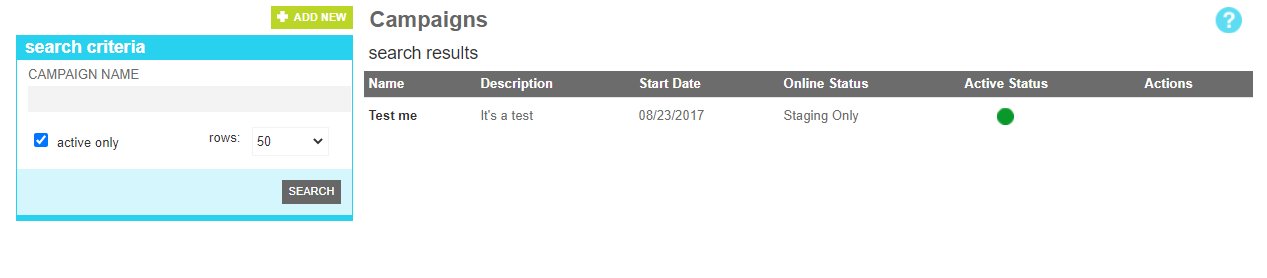
These attributes are as follows:
| Property | Description |
|---|---|
| Campaign Name | All or part of the campaign name |
| Active Only | Filters your result to only show currently active users |
| Rows | Limits the results to the indicated number. |
The details screen allows you to manage the campaign information, including the name and description. Additionally, it contains a tool to help craft a url that you can use in external sources such as ads or emails that will track click throughs.
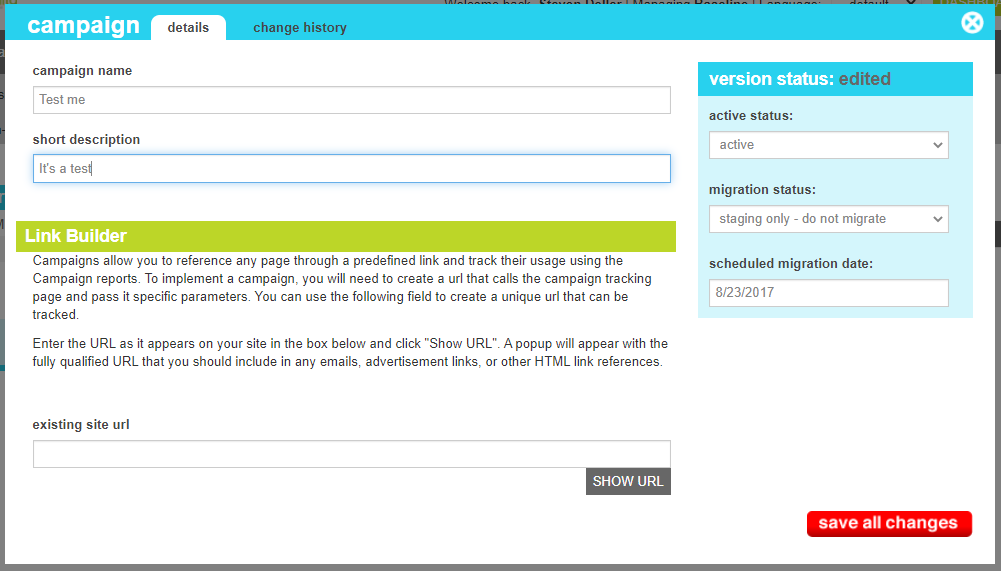
These attributes are as follows:
| Property | Description |
|---|---|
| Campaign Name | A unique identifier for the campaign. This will be used in the web reporting as well as excel exports |
| Short Description | A description of the campaign so that admins know more about its implementation. |
| Active Status | Indicates whether the account is active or inactive. If the campaign is inactive, clicks and views will not be tracked |
| Migration Status | Indicates whether the current state of this method is visible only on staging, will be migrated to production, or is currently on production. |
| Scheduled Migration Date | For items that are ready to migrate, this is the date that the changes should be migrated to production. For items that are on production, this date indicates when the change was actually migrated. |
The link builder is a tool that creates an encoded tracking link for use in external media. The following steps should be followed to use the tool:
The change history tab shows all of the changes that were made to this content item and by whom. It is useful for diagnosing unexpected changes to your content.