The webhooks tool allows an administrator to create and manage webhooks for the order and user events that are generated by the marketAgility
system. Each webhook will listen for the specific event, and when seen will communicate the change to a REST endpoint for a 3rd party provider.
This is particularly useful with keeping your external systems in sync with change to the website.
Searching
To find a webhook or webhooks that share a common attribute value, a search block has been provided. To add a new Webhook, use the Add New Button
Searching for a webhook
These attributes are as follows:
Property
Description
Name
All or part of the unique Name of the webhook
Active Only
Filters your result to only show currently active webhooks
Rows
Limits the results to the indicated number.
Details
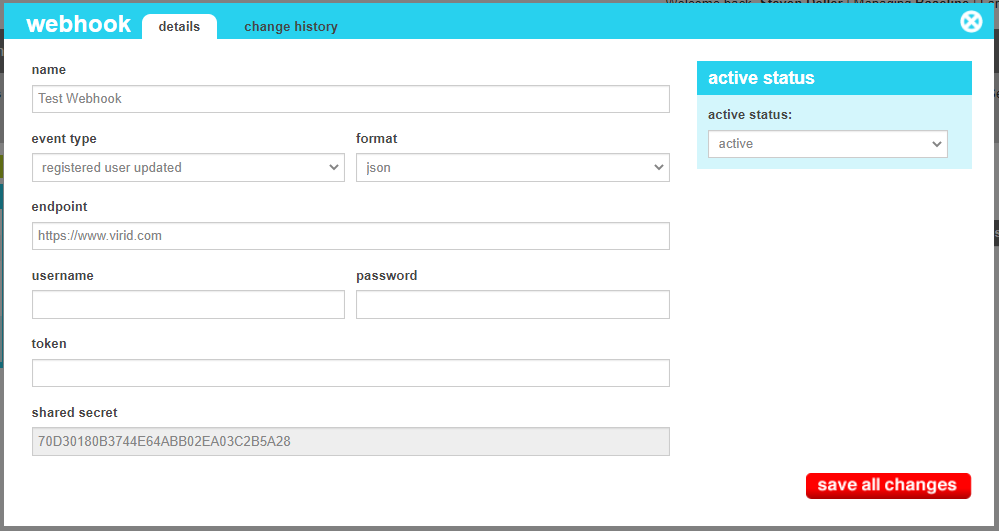
The details screen allows you to manage the webhook information, including the endpoints, API credientials and the target event.
Webhook Details
These attributes are as follows:
Property
Description
Name
The name that uniquely identifies the webhook.
Event Type
The system event that the webhook should listen to.
Format
The format of the webhook payload. Currently only JSON payloads are supporteed.
Endpoint
The fully qualified REST endpoint that will receive the payload.
Username
The username that the REST endpoint expects for authentication. Any Username and Password will be passed to
the enpoint as an HTTP Basic Authorization header.
Password
The password that the REST endpoint expects for authentication. Any Username and Password will be passed to
the enpoint as an HTTP Basic Authorization header.
Token
The token that the REST endpoint expects for authentication. Any token value present will be passed to
the enpoint as an HTTP Bearer Authorization header.
Shared Secret
Each webhook will generate an HMAC-SHA256 hash using the Shared Secret provided here. The hashed value will be present in an
HTTP Header entitled "X-marketAgility-HMAC". When receiving a webhook from the marketAgility system, it is highly
recommended that the recieving application use this hash to authenticate the message.
Active Status
Indicates whether the webhook is active or inactive. If the webhook is inactive, it will not override the default tax processor. If no default tax
processor has been defined, it will not tax the destination at all.
Change History
The change history tab shows all of the changes that were made to this webhook and by whom. It is useful for diagnosing unexpected changes to your webhook communications.