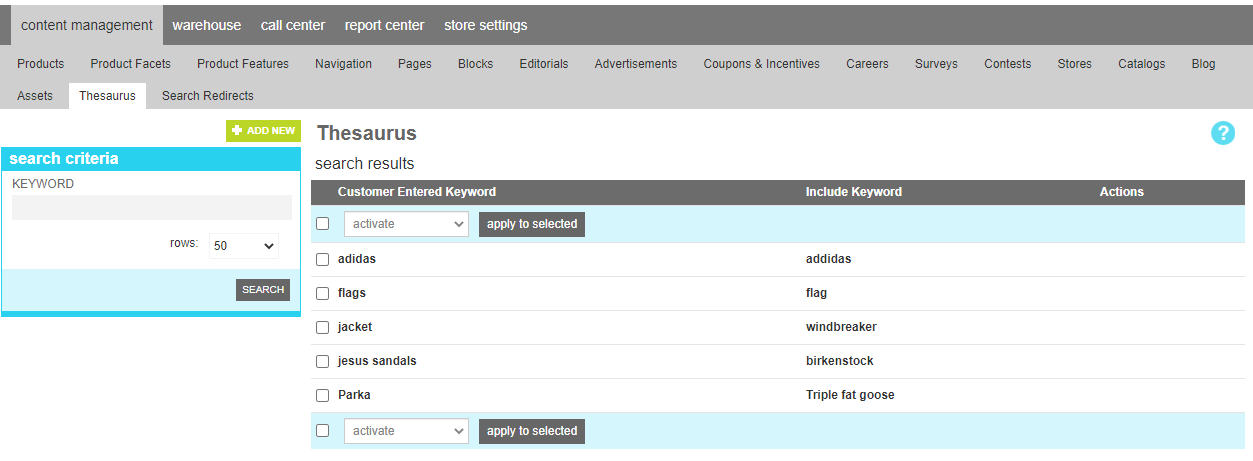
Thesaurus
A thesaurus entry is helpful with your product search for relating frequently missspelled or localized cultural terms that your customers enter to the correct terms as they exist in your product catalog. By creating these linkages you help get the correct products in front of your customers withough them having to have understanding of your specific product terminology.
A common example is that in the Northeast U.S., Jackets are often referred to as "windbreakers". If your customer is searching for windbreakers, you could add the term windbreaker to the keywords field for each of your jackets to make them match the entered keyword. That represents a significant merchandising effort. Instead, this tool would allow you to create a mapping between windbreaker and jacket, and allow your customer to use the term that comes naturally without invoking a large merchandising effort.
To identify keywords that are good candidates for a thesaurus entry, look at the search reports to identify keywords that are used with high frequency but return low match results. Frequently these indicate a mismatch between your vernacular and your customer.
Note
Thesaurus entries are only used by the marketAgility product search system. If you are integrated with a 3rd party search product, thesaurus entries entered here will not have an effect on the search results your provider presents. Reach out to your search provider for more information on how to achieve a similar result with their product.
Attributes
Thesaurus attributes are as follows:
| Property | Description |
|---|---|
| Customer Entered Keyword | This is the word your customer might enter into a search box |
| Include Keyword | This is the word it relates to that would be found in your product catalog. |