The cases tool allows call center representatives to manage customer issues within a simple workflow. Each requests that comes through one of the
marketAgility collectors are automaticallly logged into the system. Additioanlly, cases can be created manually using this tool for issues that
are received over the phone or from other means.
Cases can be assigned to any other person who has a customer service role, and can be tracked through their lifecylce by using a series of
statuses.
Searching
To find a case or cases that share a common attribute value, a search block has been provided. To create a new one, use the "Add New"
button above the search block.
Searching for a fulfillment provider
These attributes are as follows:
Property
Description
Status
The status of the case you are looking for. Valid Options are
Assigned To Me - All cases assigned to the viewer
All - All cases
New - All cases that have come into the system but have not been addressed
Open - All cases that are in the process of being resolved
Closed - All cases that are resolved
Order #
Cases involving the provided order #
Case #
Cases having the provided case #
Start Date
Cases created on or after this date
End Date
Cases created on or before this date
Rows
Limits the results to the indicated number.
Details
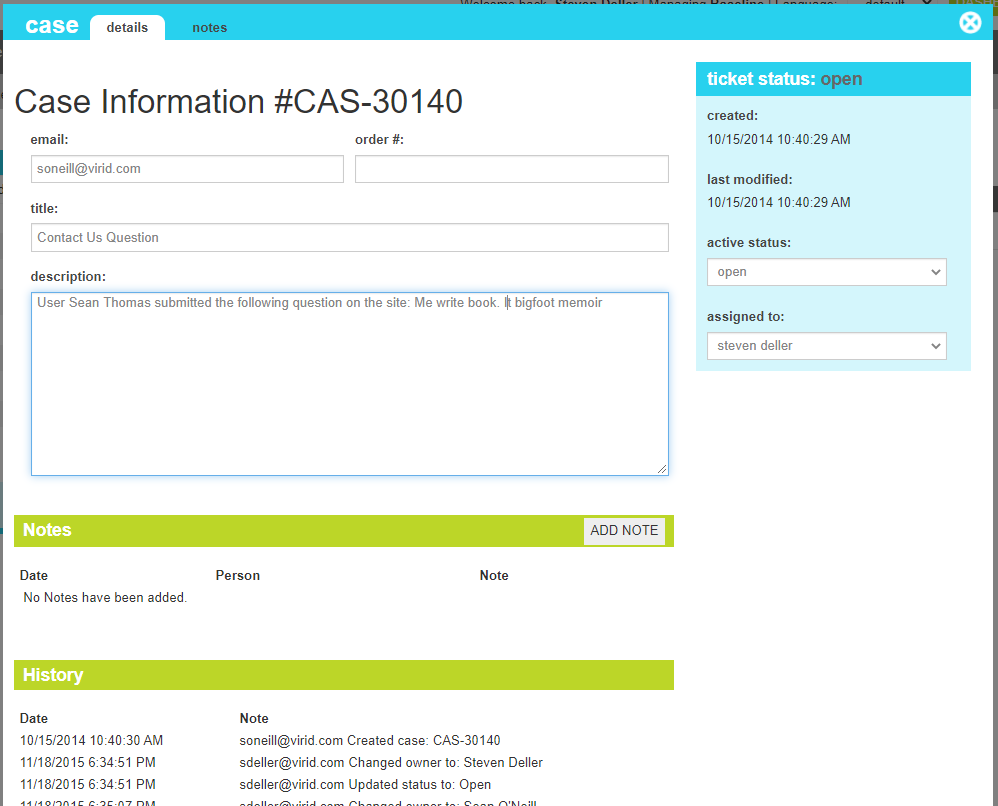
The details screen allows you to manage the case information, including the requestor, basig information about the request, and its status. In
addition, the history of activity can be seen here along with providing the ability to add notes.
Case Details
These attributes are as follows:
Property
Description
Email
The email address of the requestor.
Order #
The order number this request is concerning (if available).
Title
A short description of the request.
Description
A detailed explanation of the issue and what is being asked.
Active Status
The current status of the case. Available values are :
New - The case is new and has not been triaged.
Open - The case is actively being worked.
Closed - The case has been resolved.
Assigned To
The Call Center Representative that is assigned to this case. The list of valid peeople includes any admin tool user that
has permissions to access this screen.
Notes
Ths section details the notes that have been added along with providing a shortcut to adding a new note
History
Ths section details the history of activities and interactions that have occurred with this case, since its creation.
Notes
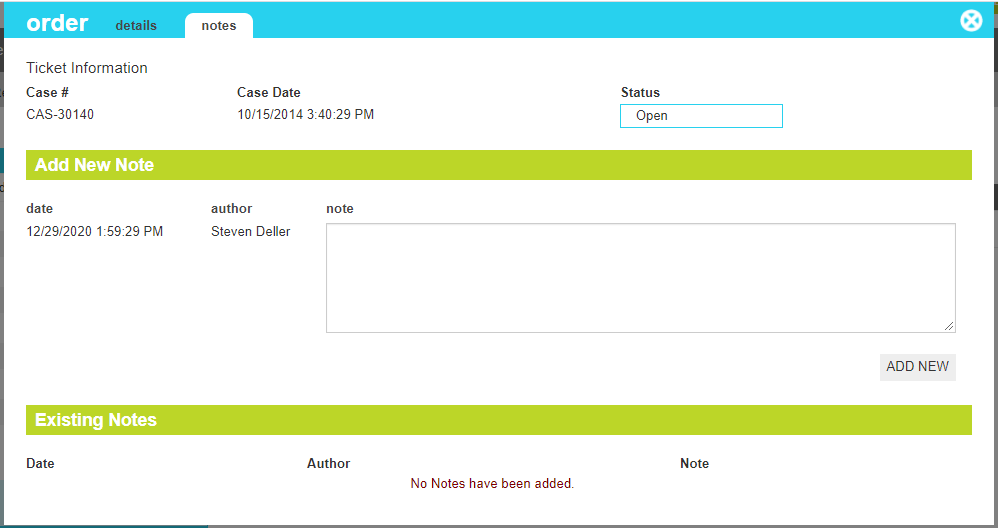
The notes screen allows you to view and create case notes as new interactions occur or additional information is obtained.
Case Notes
These attributes are as follows:
Property
Description
Date
The date of the new note. This is provided automatically and cannot be edited.
Author
The author of the new note. This is provided automatically and cannot be edited.