Shipper Management
The shipper management tool allows an site administrator to manage the 3rd party shipping providers and SCAC codes associated with each shipping method defined in the site.

The shipper management tool allows an site administrator to manage the 3rd party shipping providers and SCAC codes associated with each shipping method defined in the site.
To find a shipper or shippers that share a common attribute value, a search block has been provided. To create a new shipper profile use the "Add New" button.
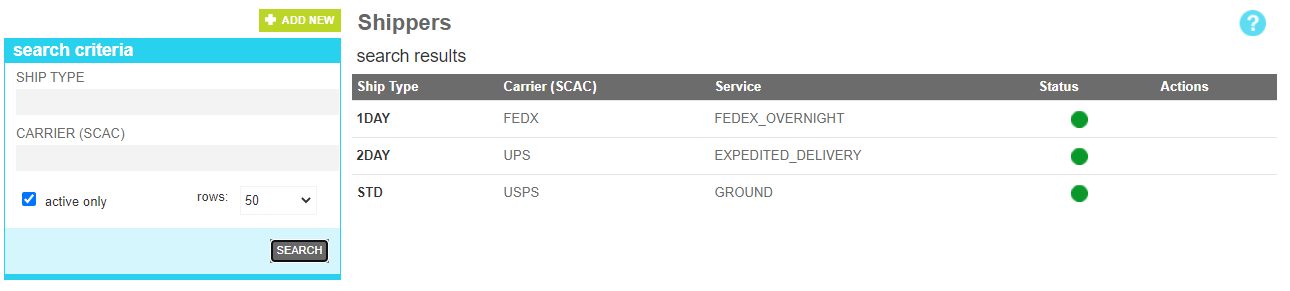
These attributes are as follows:
| Property | Description |
|---|---|
| Ship Type | All or part of the shipping type code of the targeted profile |
| Carrier (SCAC) | The carrier code used by the shipping profile (typically FedEx, UPS, USPS, etc) |
| Active Only | Filters your result to only show currently active users |
| Rows | Limits the results to the indicated number. |
The details screen allows you to manage the distinct shipper profile informantion, including the SCAC and service values, Shipping address and basic fulfillment options associated with the service.
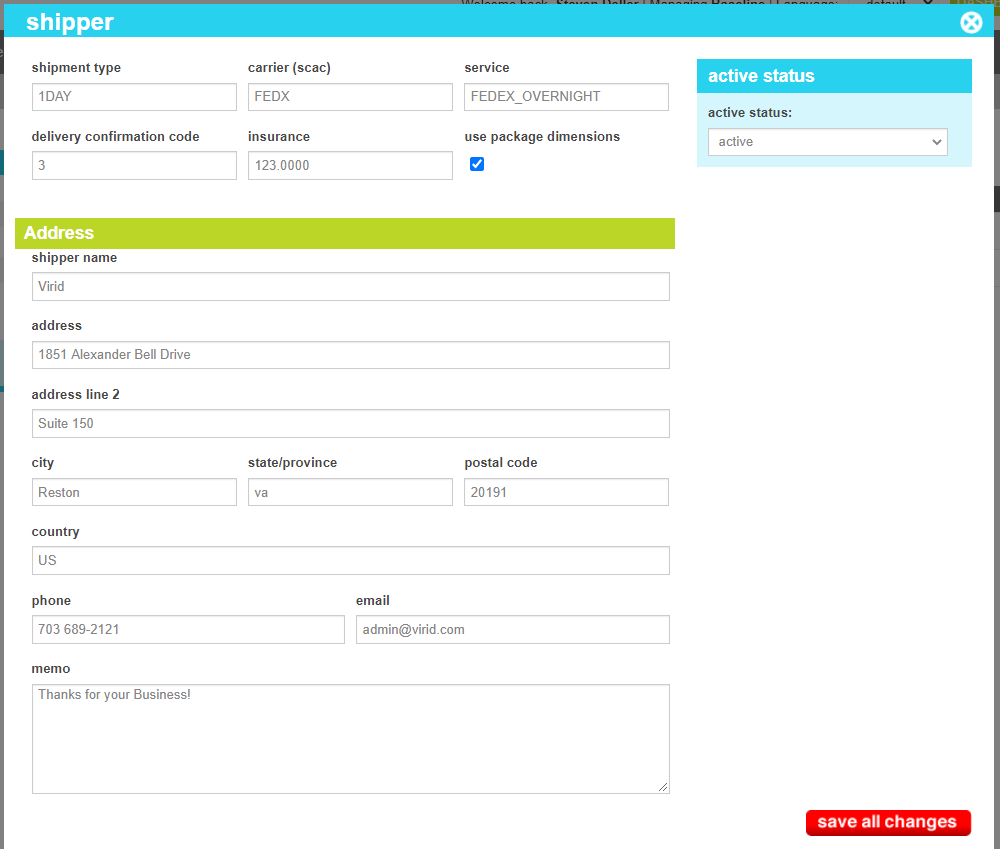
These attributes are as follows:
| Property | Description |
|---|---|
| Shipment Type | The shipping method code defined on the order |
| Carrier | The carrier that will service this shipping method. |
| Service | The carrier-specific service code that should be communicated to the carrier for this shipment |
| Delivery Confirmation Code | The carrier-specific value that shoudl be issued to indicate that the shipment requires delivery confirmation. |
| Insurance | The base amount that the package should be insured for. |
| Use package dimensions | This indicates whether the shipment should communicate the dimensions of each sku to the carrier. If not checked, a default cube value (1x1x1) will be sent. |
| Shipper Name | The merchant name as you would like it to appear on your shipping label. |
| Address | The address line 1 of the shipper's address |
| Address Line 2 | The address line 2 of the shipper's address |
| City | The city of the shipper's address |
| State | The state or province of the shipper's address |
| Postal Code | The postal code of the shipper's address |
| Country | The country of the shipper's address |
| Phone | The phone number of the shipper |
| The email address of the shipper | |
| Memo | Any merchant notes to be included on the shipping label |
| Active Status | Indicates whether the profile method is active or inactive. If the profile is inactive, the shipping information will not be communicated to the provider if an order with this method is shipped. It is expected that the label will be generated manually. |