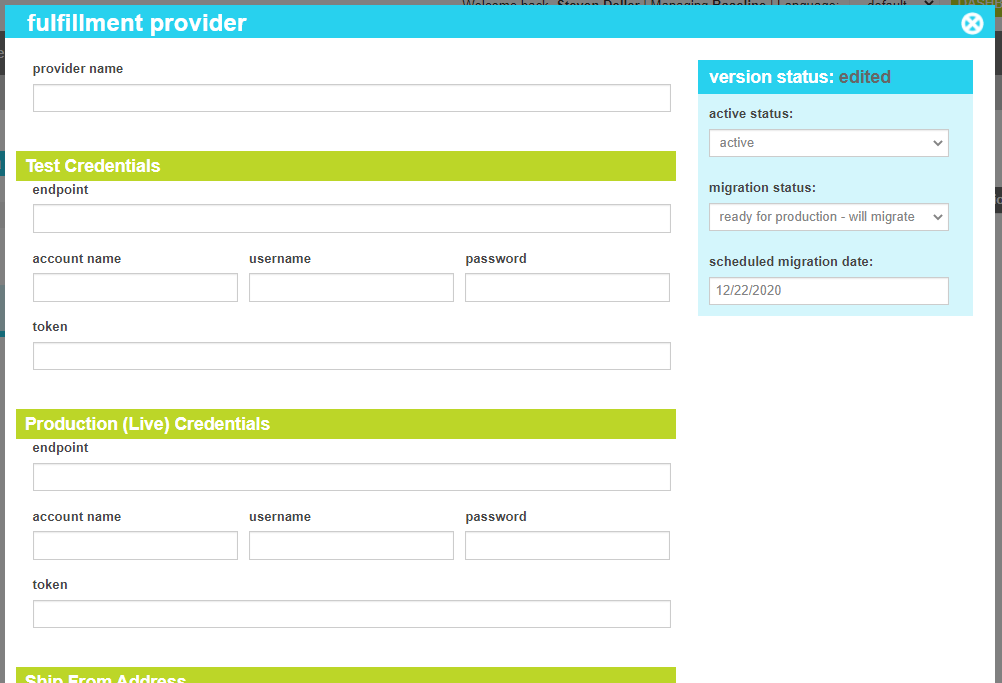
| Provider Name |
The Unique name for the provider record. |
| Test Credentials |
These fields provide the credentials for fulfilling staging orders |
| Endpoint |
The url that the API should use to communcate test orders |
| Account Name |
The account name for the test endpoint |
| Username |
The account username for the test endpoint |
| Password |
The account password for the test endpoint |
| Token |
The API token for the test endpoint |
| Production (Live) Credentials |
These fields provide the credentials for fulfilling live orders |
| Endpoint |
The url that the API should use to communcate live orders |
| Account Name |
The account name for the live endpoint |
| Username |
The account username for the live endpoint |
| Password |
The account password for the live endpoint |
| Token |
The API token for the live endpoint |
| Ship From Address |
This section allows you to configure the ship from address for orders shipped thorugh this provider |
| Address |
The street address (Line 1) |
| Address Line 2 |
The street address (Line 12) |
| City |
The city of the user's address |
| State |
The start or province of the user's address |
| Postal Code |
The postal code of the user's address |
| Country |
The country of the user's address |
| Phone |
The phone of the warehouse |
| Email |
The email address of the warehouse |
| Processor |
The name of the fulfillment plugin dll. |
| Active Status |
Indicates whether the provider is active or inactive. If the provider is inactive, it will not be offered during the the fulfillment process. |
| Migration Status |
Indicates whether the current state of this provider is visible only on staging, will be migrated to production, or is currently on production. |
| Scheduled Migration Date |
For items that are ready to migrate, this is the date that the changes should be migrated to production. For items that are on production, this date indicates when the change was actually migrated. |