
Introduction Last updated: 2026-03-03
The marketAgility REST API allows you to interact with your marketAgility storefront using external applications.
Access to the REST APi is controlled through the marketAgility user administration panel.
Endpoints
The Admin API exists inside the marketAgility administration site. The base endpoint for all API commands in this references is: https://<admin-site-url>/api/<version>/
Each API method is available by suffixing the base URL with the method name. For instance, the endpoint for products requests is: https://mysite-admin.marketagility.com/api/v3/products/1234.
Authentication
Access to the apis is controlled through the Apps access panel in your web admin tools. To create an api account, you must navigate to the Apps tab in the Store Settings section. There you can register your application by giving it a name, username and an email of a person responsible for the application.
Once the app has been registered, an access token will be assigned that you can use in your app to authenticate with the APIs.
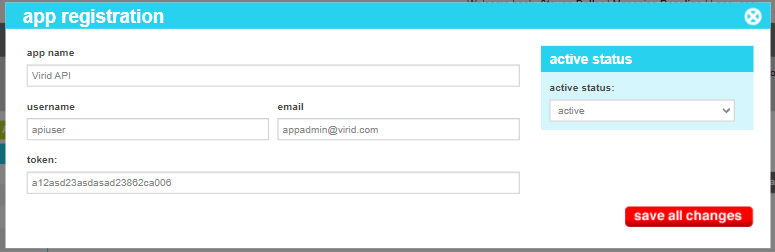
The marketAgility API system uses HTTP Basic Authentication, which relies on a username/password pair. The username in your authentication is the username of the account created in the web Administrative Users panel. The password is your API token.
Once you have instrumented your authentication code, the Authorization header should have a value in the form: "Basic YWxhZGRpbjpvcGVuc2VzYW1l".
    {
        var credentials = Convert.ToBase64String(Encoding.ASCII.GetBytes($"{username}:{apiToken}"));
        httpClient.DefaultRequestHeaders.Authorization = new System.Net.Http.Headers.AuthenticationHeaderValue("Basic", credentials);
    }
Specifying your environment
marketAgility has two different data environments. The staging environment is where you create and test your dynamic content and site changes before they go live. The production environment is the live site that customers use to transact business, and only includes content that has been approved for release.
The APIs automatically select the normal environment that they are most typically used for without any necessary decoration of your API requests. Any calls to add, update, or create dynamic content are automatically routed to the staging environment. Requests for customer, order or fulfillment data are automatically routed to the production environment.
To manually select the environment you would like to interact with, you can add an HTTP header "X-marketAgility-Environment" to specify the environment you wish to reach. Setting it with a value of "production" will force the request to go against the production system. Setting it with a value of "staging" will force the request to go against the staging environment. The values are not case sensitive
    {
        var request = new HttpRequestMessage(method, uri) { Content = content };
        request.Headers.Add("Accept", "application/json");
        request.Headers.Add("X-marketAgility-Environment", UseStaging ? "staging" : "production");
    }
Note
While you can direct a dynamic content api request to the production envirohnment, you cannot directly update content in production as it would violate the normal workflow rules and auditing protections. If you attempt to add, update or delete content such as products or advertisements in the production environment, you will receive an HTTP 403 - Unauthorized error.
Specifying your language
marketAgility supports multi-language content for many of its content types. Once a content element has been created in a default language, additional versions of the content can be created in the languages enabled in your site settings.
To indicate that the content you are requesting or providing is for a different language than the default language, you can add an HTTP header "X-marketAgility-LanguageCode" to specify the 2 character language code that relates to your content. For example, leaving it blank or omitting the header altogether will tell the API that you wish to set or retrieve the content in the default language. Setting it with a value of "es" indicates that you are working with the Spanish version of the content. Additional language codes include "de", and "fr". The values are not case sensitive.
    {
        var request = new HttpRequestMessage(method, uri) { Content = content };
        request.Headers.Add("Accept", "application/json");
        request.Headers.Add("X-marketAgility-LanguageCode", "es");
    }
Note
When creating content for the first time, the language code is ignored. Any content that is provided in the create statement will be stored in the default language version.
Specifying your Site Id
marketAgility supports multiple sites per client. Your primary site is #1, and is implied in all API calls. If you are accessing your primary site you do not need to include the site id designation in your API calls.
To access a secondary site, you can add an HTTP header "X-marketAgility-SiteId" to specify the numerical site id that you wish to access.
    {
        var request = new HttpRequestMessage(method, uri) { Content = content };
        request.Headers.Add("Accept", "application/json");
        request.Headers.Add("X-marketAgility-SiteId", "2");
    }
Note
Each site has its own app registrations and as such independent credentials. In order to access a secondary site using the site Id header, you must first create and app registration for that site and use the credentials specific to that registration when issuing your api call. If you attempt to use the credentials for one site but specify a different site id, you will receive an HTTP 403 - Unauthorized error.
Rate Limits
All calls through the marketAgility Admin API are rate-limited to a set number of requests per minute based on your platform subscription. Once the rate limit has been exceeded, subsequent calls will recive an "HTTP 429 - Too Many Requests" for a period of time until the next measuring period has been reached.
Every HTTP Response from the marketAgility API will contain 2 headers for use in configuring your application to gracefully navigate the rate limiting system.
| Name | Description |
|---|---|
| X-Throttle-Requests-Remaining | The number of requests left in the current throttling period before you are throttled (integer 0-199) |
| X-Throttle-Next-Period | The time, in seconds, before the next throttling period begins. |
To effectively use these headers, after each call to the API, examine the number of requests remaining. If the value is zero, add a wait loop in your response for the number of seconds inidicated in the Next Period header before returning the result to the calling method. This will slow down as needed to match the API throttling and eliminate any errors you would otherwise encounter.
    // Check the headers after getting a response from an API call
    int requestsRemaining = GetHeaderInt(response.Headers, "X-Throttle-Requests-Remaining");
    int nextThrottlePeriod = GetHeaderInt(response.Headers, "X-Throttle-Next-Period");

    //Handle Throttle - If we have hit the limit, wait until the next throttle period before returning the result
    if (requestsRemaining <= 1) await Task.Delay(nextThrottlePeriod * 1000);
Troubleshooting
For any questions regarding the marketAgility API please contact [email protected] and include the request(s) and response(s) you are inquiring about.
If you do not have any detailed information, please reach out to our support group at (703) 689-2121.